Avatar Studio Rules & Guidelines
Avatar Studio Rules & GuidelinesWe appreciate your creativity and dedication to making UGC avatar item creation a vibrant part of creating for Rec Room. To ensure an environment where all our users can be excellent to each other during this evolving phase of Avatar Studio tools development, we require that all creators adhere to the following rules & guidelines. By creating and submitting avatar items to be published in Rec Room, you agree to the following rules and guidelines:
1. Rec Room’s Codes of Conduct.All creators must abide by Rec Room’s Terms of Service, Code of Conduct and Creator Code of Conduct. Please read these documents in full - we have included a summary of especially relevant sections below:A. Prohibited Content:
Avatar items must be appropriate for all ages and should not include offensive, inappropriate, or controversial themes. We prohibit:
All submitted content must either be original or used with clear permission from the creator.
Examples of acceptable use include:
Avatar items must be appropriate for all ages and should not include offensive, inappropriate, or controversial themes. We prohibit:
- Racist, sexist, ableist, xenophobic content, hate symbols, or discriminatory language or images.
- Content created to bully, harass, or threaten others, or share personal information.
- Content referencing real wars, real-world conflicts, specific countries or military operations. War-themed content should be generalized.
- Excessive depictions of blood, gore, or graphic violence.
- Content involving or suggesting child abuse, exploitation, or endangerment. We work with law enforcement in such cases.
- Content that promotes real-world violence, self-harm, or extremist ideologies.
- Sexually suggestive or fetishized content, including nudity, sexualized poses, and references to sexual acts.
- Content encouraging illegal behavior or defamation.
- Content referencing politics
- Regulated or age-restricted content, including:
- Drugs or drug paraphernalia
- Gambling or lotteries
- Tobacco, vaping, or nicotine product
All submitted content must either be original or used with clear permission from the creator.
Examples of acceptable use include:
- Uploading a model created by a collaborator or commissioned artist
- Uploading AI-generated content if you own or have the rights to it
- Uploading items made by others with their express permission
2. Avatar Item Moderation Requirements:Avatar Items must meet specific moderation requirements to ensure that Rec Room remains a safe and welcoming environment for all players. Creations that do not abide by these requirements will not be published or will be unpublished if found to be in violation post-publication. Violations of these requirements by a creator will result in removal of Avatar Studio access privileges.A. Modesty Covers & Sexualized Content
Items must follow the Creator Code of Conduct. Sexual or sexually suggestive content is prohibited—including lingerie, and any exposed genitalia, cleavage, or buttocks.Avatar items must meet the modesty validator coverage built into Blender. (Note that this is different than the modesty culling). These include:
Items must follow the Creator Code of Conduct. Sexual or sexually suggestive content is prohibited—including lingerie, and any exposed genitalia, cleavage, or buttocks.Avatar items must meet the modesty validator coverage built into Blender. (Note that this is different than the modesty culling). These include:
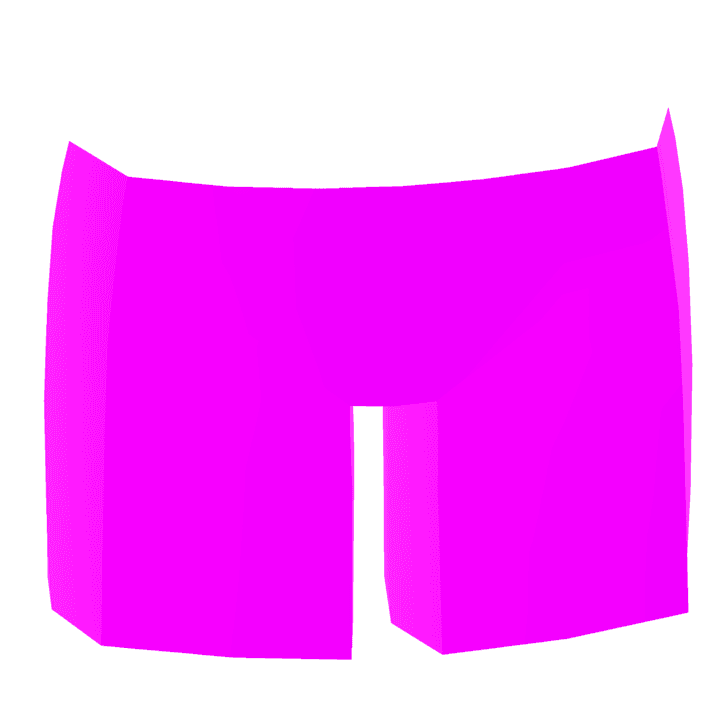
- Coverage from hips to upper thigh (pants, skirts, leg items)
- Coverage from upper chest to lower stomach (shirts, tops, dresses)

- Some form of back coverage (no completely exposed backs)

- Do not use skin-tone-colored meshes to imply nudity. Using skin tones for stylized purposes (e.g. gloves, masks) is okay - but utilizing skintone meshes within the modesty validators is not allowed.
- These are minimum standards. Items may still fail moderation if they appear inappropriate in context or when combined with other items.
Chest Forms
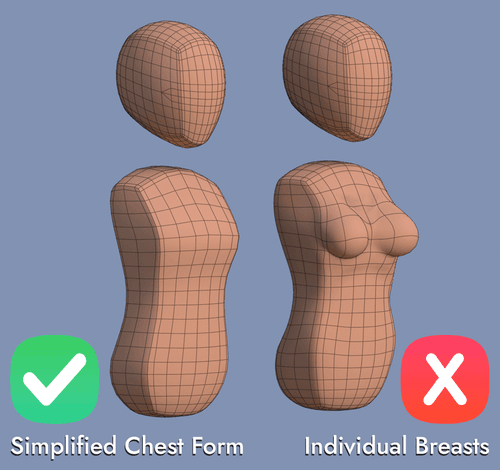
- Stylistic representation of the chest is okay, but avoid shaping or emphasizing breasts or cleavage.
- Focus on simplified chest forms rather than defined parts of the chest.
- The chest shelf shouldn’t extend too far since players can adjust it further with in-game sliders.
Rear Forms
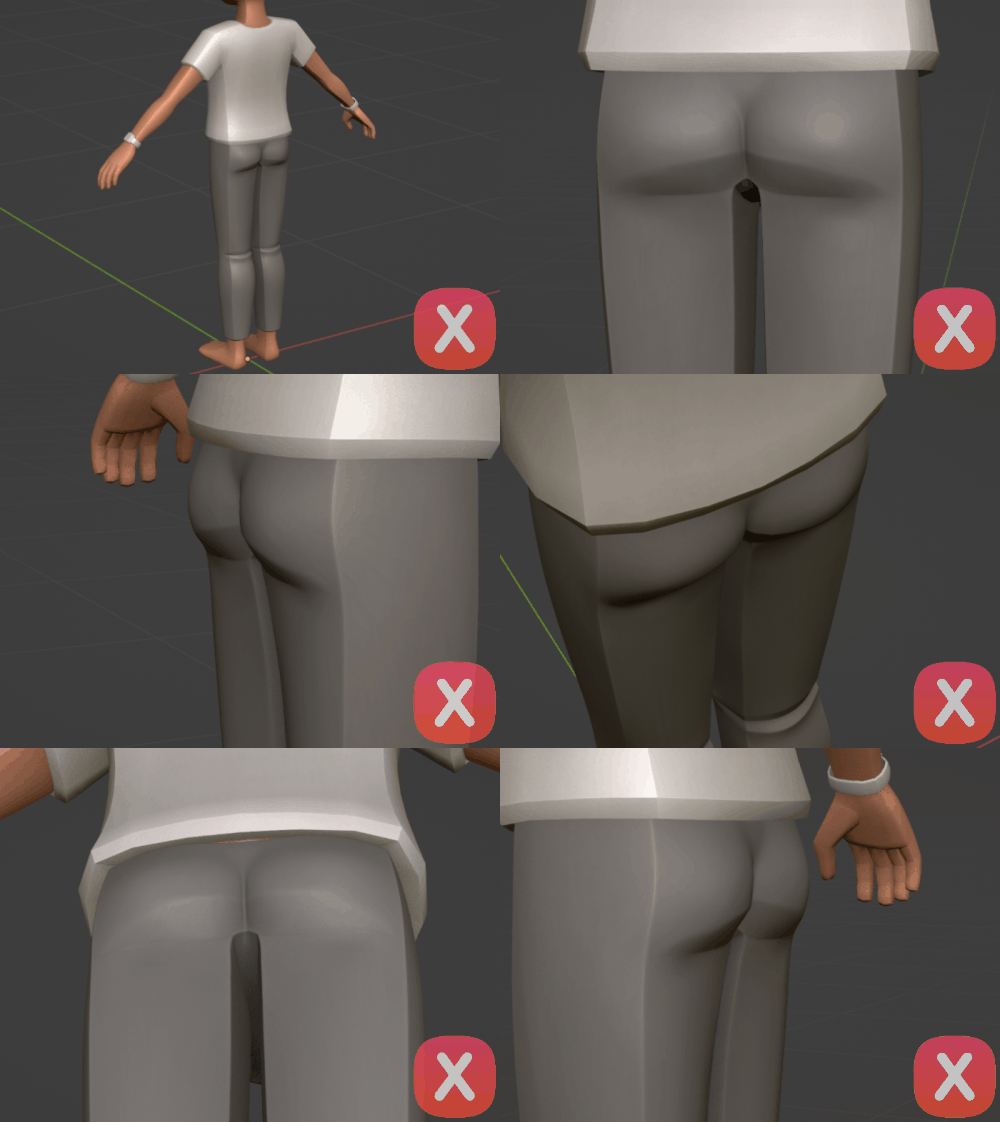
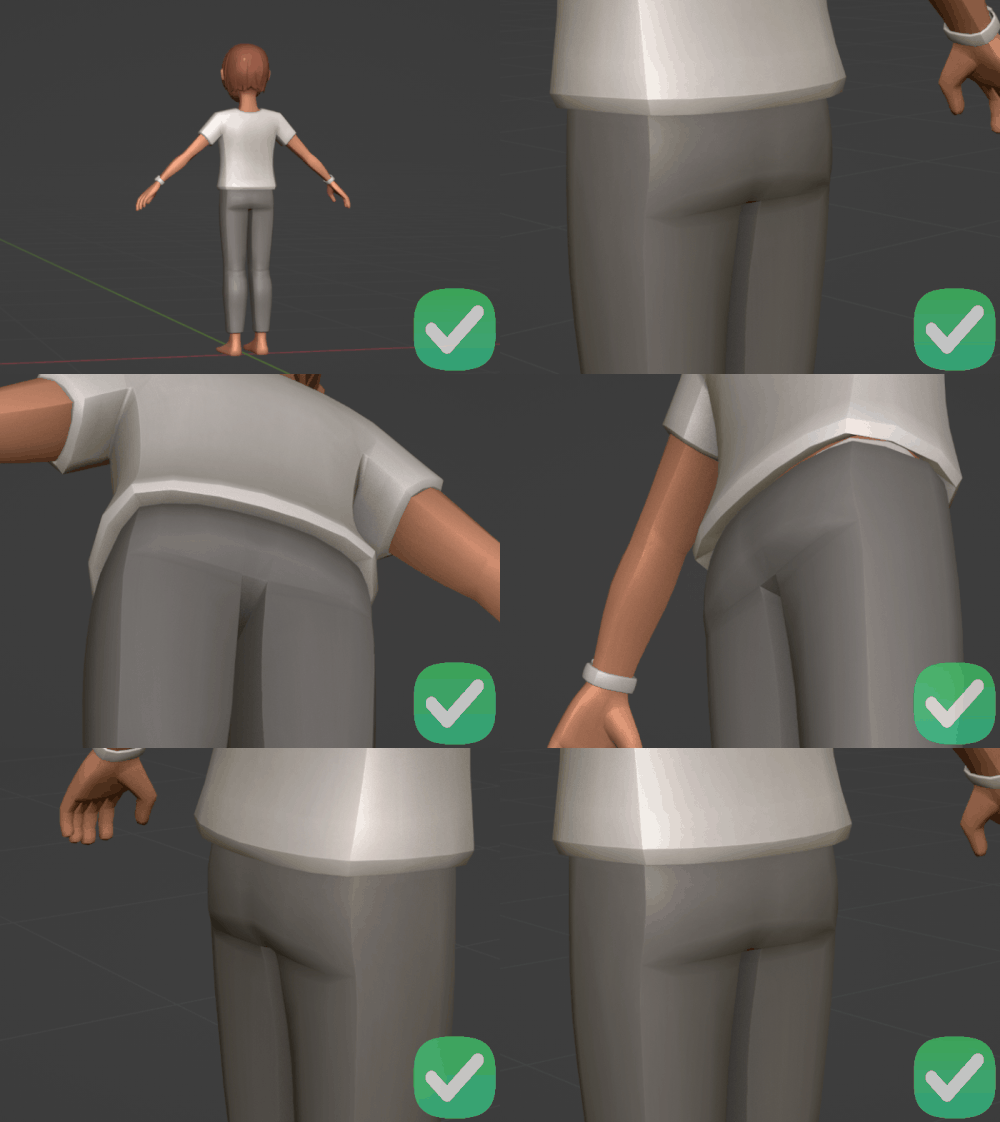
- Detailing, shaping, or exaggerating parts of the buttocks is not allowed.
Groin Area
- Creators should not sculpt or define the groin area. For example, a bulge shape in this area of the body is not allowed.
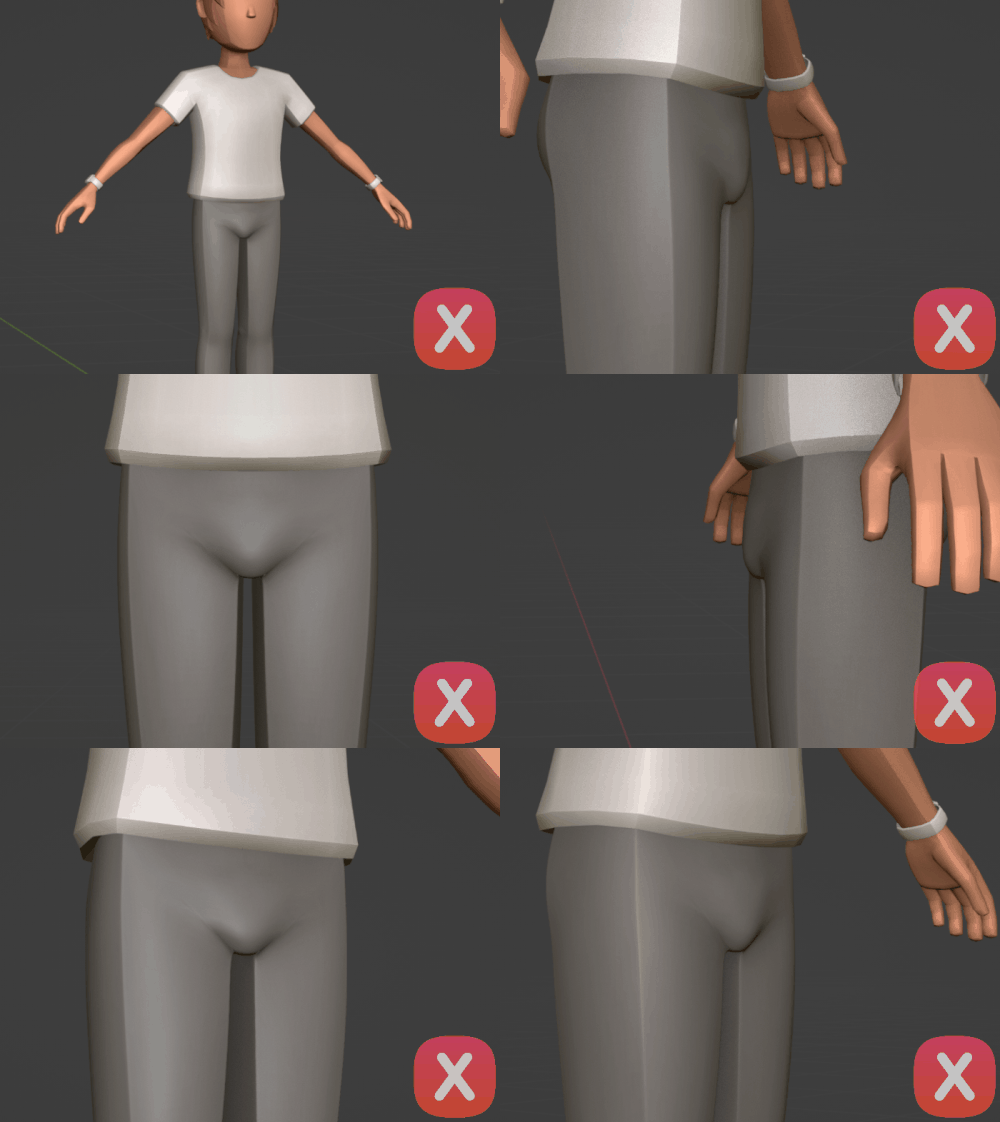
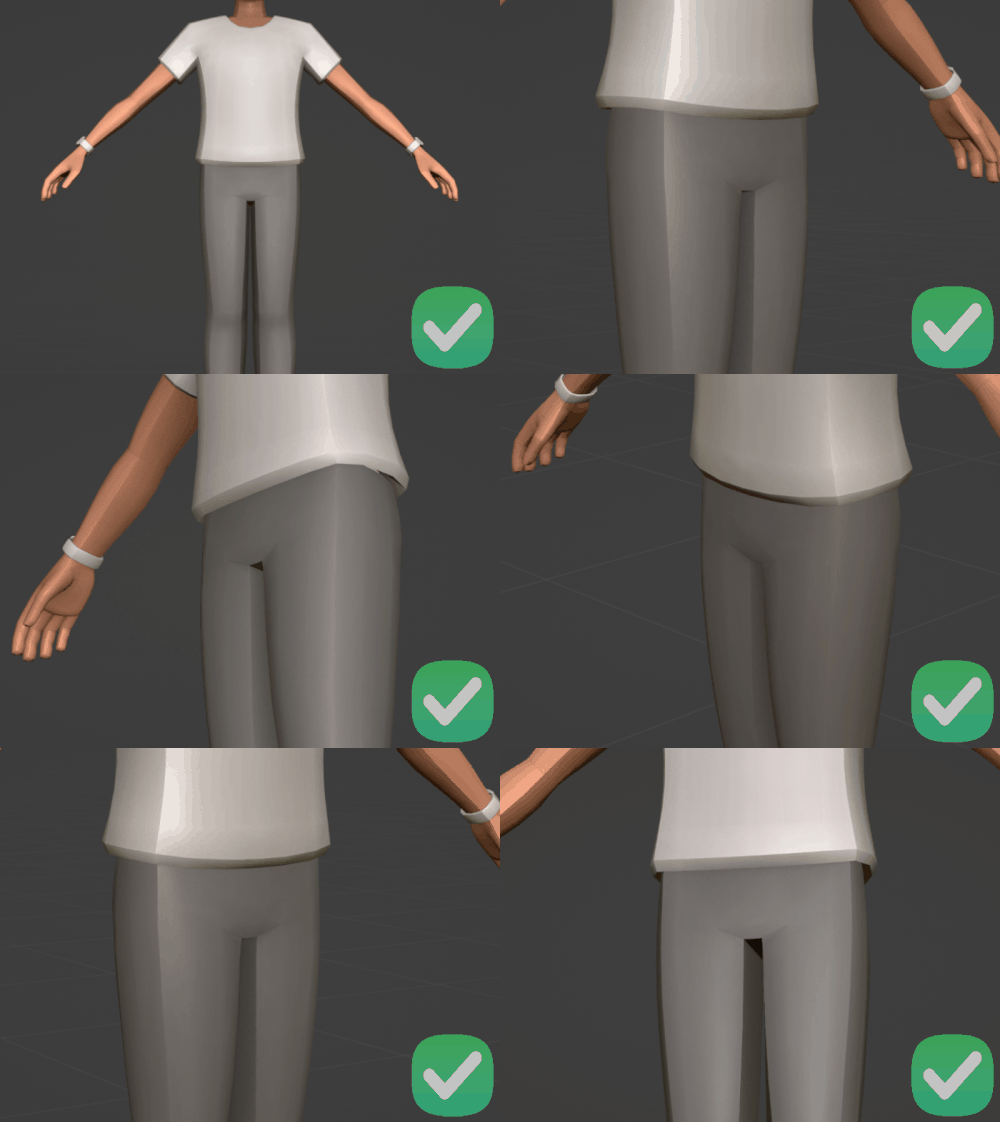
Muscle Groups
- We allow stylistic representation of muscles, but creators should not sculpt or define the Iliac furrow (commonly referred to as the “Adonis,” “Apollo belt,” or “v-line”) or the glutes.
Stomach Area
- Belly buttons may not be sculpted, shaded, or otherwise represented on avatar items.
- Outfits should not include detailing that suggests or emphasizes a belly button.
C. Weapons, Gore & Violence
- When creating weapons, focus on playful and stylistic representations instead of realistic depictions.
- Fake, colorful, or stylized play weapons, like cartoon blasters or airsoft guns, are allowed.
- Projectile weapons should look like fun, playful toys, and shoot projectiles that would be non-lethal in real life.
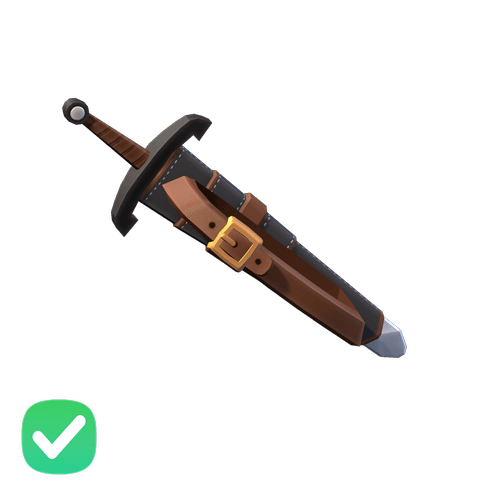
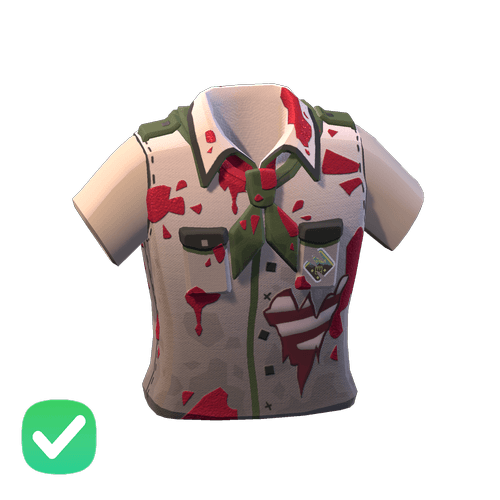
- Depictions of blood or gore should feel cartoony, theatrical, and fake. In Rec Room terms, they should appear more like a theater department prop than an actual extension of the avatar body.
- Bright, shiny blood that looks like ketchup, or cartoon-like brain pieces that seem made of rubber or foam, are examples that would be permissible.
D. Other Requirements:
- Items may not depict babies, toddlers, or children and may not represent them (e.g. children being carried or worn, recreations of childcare gear, etc.)
- Items may not recreate restricted Rec Room assets, utilize official Rec Room logos or textures (e.g. Luxe texture), or otherwise closely resemble official Rec Room official items (e.g. Roomie’s name/likeness).
- Models that were part of previous contest items, RRO games, or limited-time/Exclusive items (excluding the classic tee shirt) cannot be used as of February 11 2026. Anything prior will be unlisted/grandfathered to the system.
- In addition, textures, meshes, or the likeness of contest/limited items cannot be used as part of other items (e.g., patterns, logos, and designs).
- All items submitted must have both a Full Body Avatar (FBA) and "Bean" (MB) version.
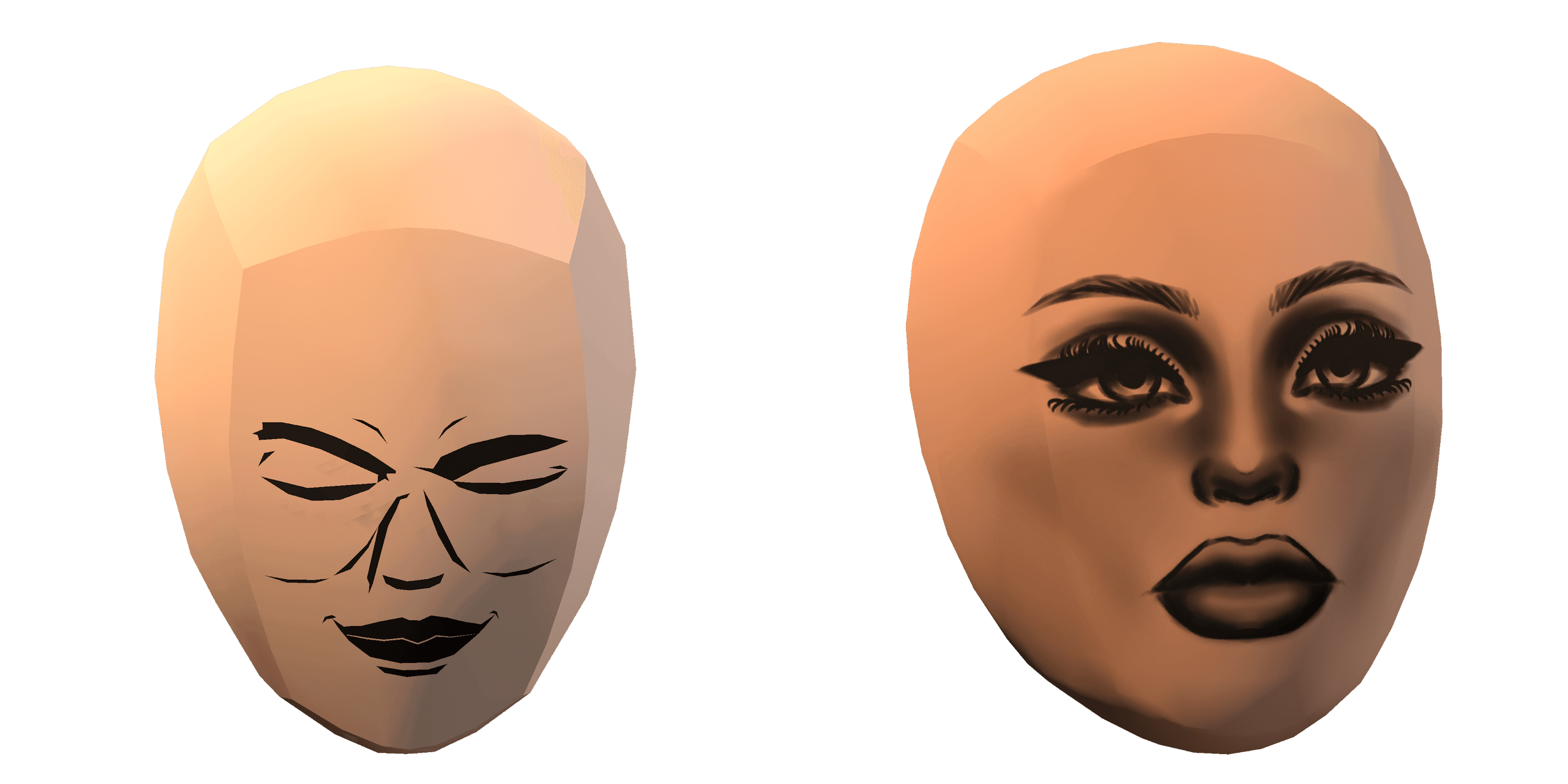
- Items must not contain or display photorealistic depictions of human faces. This applies to all items.
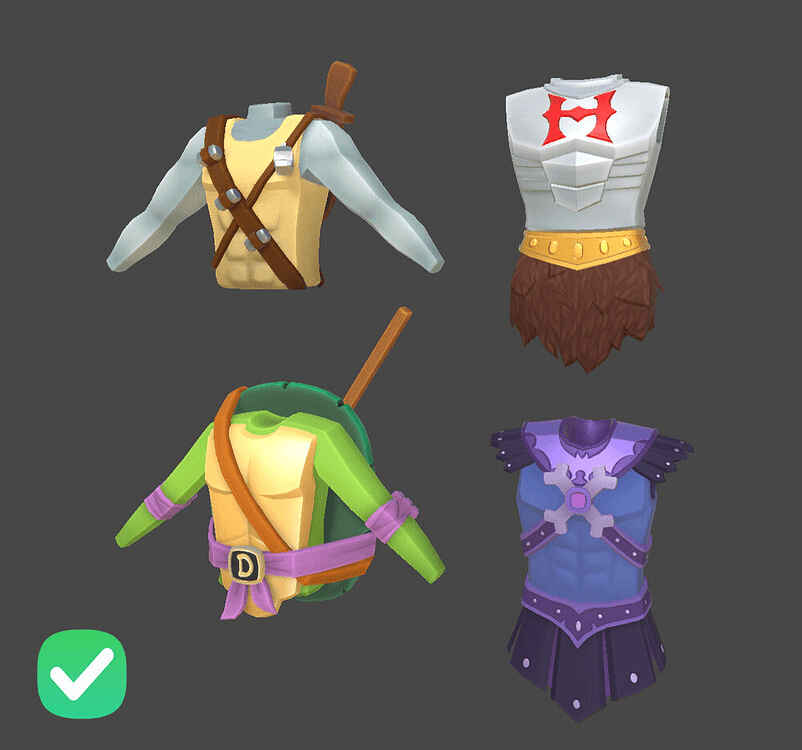
- Stylized or cartoon representations are allowed, especially if they feel like a natural extension of the Rec Room art style. For example, the following items are acceptable:
3. Avatar Item Design Guidelines:To ensure a consistent user experience and moderation standards, creators should follow these item design expectations. As with all guidelines, some of these are open to interpretation - so please ask Rec Room Staff or Avatar Studio Ambassadors before doing something you are unsure of. If you publish something that violates a guideline, Rec Room reserves the right to take the item down or ask for modifications.A. The Robocop Rule: Creating for the Rec Room AvatarCreators should preserve the visual “soul of the bean” — the sense that a core avatar exists inside the costume. Especially for Bean avatars, this helps maintain Rec Room’s unique aesthetic and gameplay identity.The guidance below applies only to Head + Torso items on Bean and Full-Body avatars, and to Neck items on Full-Body avatars.
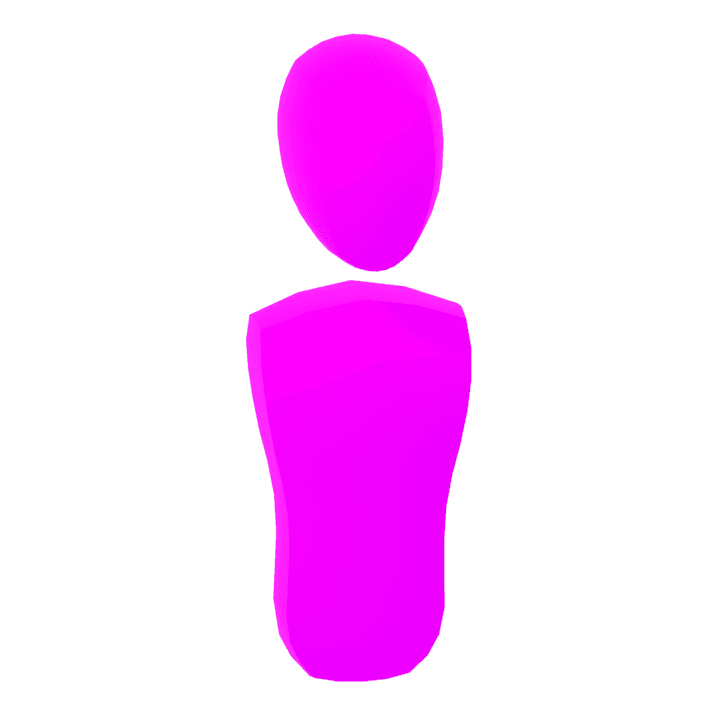
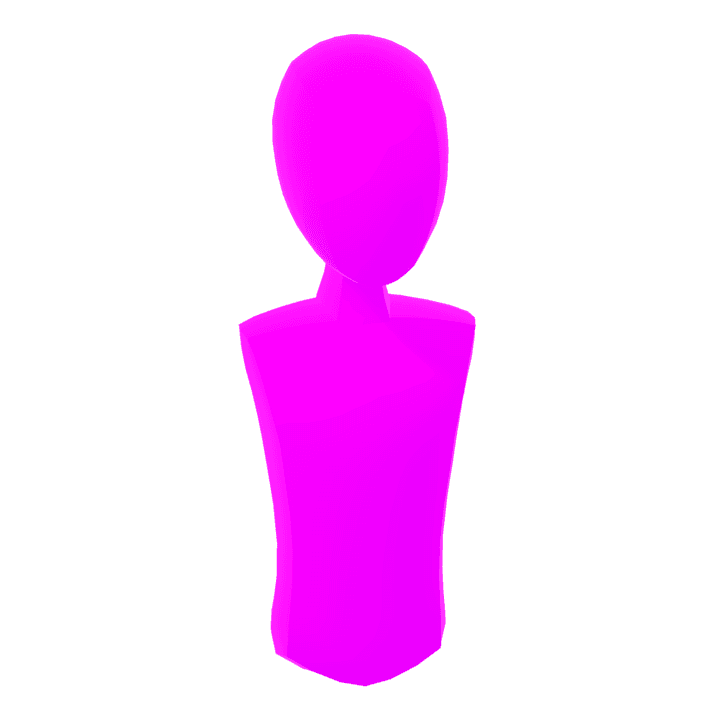
- Full helmets are allowed and can use head culling groups (which are now enabled). These must fully replace the face and head visually.
- For the head + torso silhouette only, visual bones or internal structures (e.g., skull, ribs, spine) may replace flesh or fabric as long as they meet or exceed the validator silhouette; limb slots are exempt and may float or detach where stylistically appropriate.
- For FBAs, a neck is not required to be explicitly covered, but there should be some clear representation of one. A floating head with no transition is discouraged unless stylistically intentional and well-executed (e.g. ghost or skeleton themes).
- For Bean avatars, avoid directly modeling arms or necks that break the floating-limb look. Instead, use creative proxies like shoulder pieces, scarves, or accessories.
- For FBAs, full-body realism is allowed, and culling groups can be used as long as replaced parts still meet coverage and silhouette requirements.
- Culling groups (e.g. to hide the nose, ears, or neck) may be used if the replacement part fully covers or replaces the original.
- Creators may design ears or similar accessories that intentionally replace the default ear mesh if they are properly weighted and cover the area.
- A visible neck is not required to be covered so long as the visual replacement matches or exceeds the original silhouette.
- Culling & Replacement Parts" section that legs and arms can be culled for any creative purpose as long as creators are not abusing culling groups to avoid thoughtful variants for the floating bean and full body avatar.
- Flipped normals can be used to create cool effects like faux transparency or skeleton interiors. They may be used on accessories layered on top of clothing such as hats, belts, neck items, shoulders, and ears.
- Flipped normals do not count as coverage for moderation purposes (e.g., they do not satisfy modesty or validator requirements).
- Limbs or other body parts must still meet coverage requirements using forward-facing geometry unless they are being visibly and volumetrically replaced (e.g., bones, shells, etc.).
- Transparent materials are currently only allowed on eyewear items which occupy the “_Eye” slot. Maximum of 2 materials (1 opaque, 1 transparent). Do not layer multiple transparent mesh shells, as this causes performance issues.
- We provide bounding boxes in our Blender tooling for each item type and validate against these in Avatar Studio. UGC items need to fit into the bounds defined for that item type. Additionally, we include a sphere around the avatar’s head where creators should avoid modeling details that could clip into the face of VR players.
- Gameplay is also very important to consider in avatar items. Creators should test every item they make in game in crawling/prone states, and in third-person on screen devices, to make sure items do not create a bad gameplay experience.
- Final model format supported: FBX format only
- Triangle (tris) Count expectations: target 6-8k per full outfit set (LOD0)
- We require artists make 3 LODs (LOD0, LOD1, LOD2)
- LOD0
- used on high-end platforms when seen close up
- LOD1
- the starting LOD for mid to low-end platforms like mobile and untethered Quest
- shown on high-end platforms at a medium distance
- 65% the poly count of LOD0
- LOD2
- shown from a far distance and will usually look bad viewed close up
- 25% the poly count of LOD0
- Note: Each LOD can only be 1 mesh object per Avatar Item
- LOD0
- While we allow the publishing of recolors - we do not allow item spamming. Do not publish multiple versions of the same item without significant changes.
- While not prohibited, we recommend avoiding excessive text in your avatar items. This may trigger moderation review and delay publication.
Every item has a required minimum base price determined by its Outfit Item Type. You are allowed to charge more - but must charge at least this minimum.Limited Time/Quantity Items
Limited quantity/Limited Time items should not be sold.Combo Items
When creating a combo item (an avatar item that occupies multiple outfit slots) the required price must be equal to the combined cost of all outfit types included.Minimum Prices by Outfit Item Type
(Prices in Rec Room tokens)Item Type | Minimum Price
Headwear | 800
Ears | 500
Face | 500
Neck | 500
Shoulder | 1000
Top | 1000
Waist | 700
Hand | 700
Legs | 800
Feet | 800
Hair | 350
Beard | 350Premium Feature Multipliers
When an item has premium features, there are multipliers that stack multiplicatively. Apply each modifier in sequence to calculate your minimum price.Feature | Multiplier
Fancy | x1.6
Novelty | x1.6
Gold | x1.2
Silver | x1.1
Emissive | x2.0
Shiny | x1.4
High Fidelity | x1.2
Elevated Shoe | x1.8
Helmet | x2.0
Animated | x2.4Feature Descriptions
These are guidelines to help you determine when one of your items should apply a multiplier. Like all guidelines, please ask Rec Room Staff or fellow Avatar Studio creators if you are unsure that your item fits these categories.
Base: 1000
Modifiers: Fancy x1.6, Gold x2.2, Shiny x1.6, High Fidelity x1.2
→ Minimum Price: 6758 RRShoulder Item
Base: 1000
Modifiers: Novelty x1.6, Animated x2.4
→ Minimum Price: 3840 RRFeet Item
Base: 800
Modifiers: Novelty x1.6, Shiny x1.6, High Fidelity x1.2
→ Minimum Price: 2457 RRLegs Item
Base: 800
Modifiers: Emissive x2.0, High Fidelity x1.2
→ Minimum Price: 1920 RRHeadwear
Base: 800
Modifiers: Novelty x1.6, Helmet x2.0
→ Minimum Price: 2560 RRFAQ:Can I price my items higher than the calculated minimum?
Limited quantity/Limited Time items should not be sold.Combo Items
When creating a combo item (an avatar item that occupies multiple outfit slots) the required price must be equal to the combined cost of all outfit types included.Minimum Prices by Outfit Item Type
(Prices in Rec Room tokens)Item Type | Minimum Price
Headwear | 800
Ears | 500
Face | 500
Neck | 500
Shoulder | 1000
Top | 1000
Waist | 700
Hand | 700
Legs | 800
Feet | 800
Hair | 350
Beard | 350Premium Feature Multipliers
When an item has premium features, there are multipliers that stack multiplicatively. Apply each modifier in sequence to calculate your minimum price.Feature | Multiplier
Fancy | x1.6
Novelty | x1.6
Gold | x1.2
Silver | x1.1
Emissive | x2.0
Shiny | x1.4
High Fidelity | x1.2
Elevated Shoe | x1.8
Helmet | x2.0
Animated | x2.4Feature Descriptions
These are guidelines to help you determine when one of your items should apply a multiplier. Like all guidelines, please ask Rec Room Staff or fellow Avatar Studio creators if you are unsure that your item fits these categories.
- Fancy / Novelty: Classifies the formality or uniqueness of an item. Fancy items resemble formalwear; novelty items include costumes or out-of-the-ordinary looks.
- Gold / Silver: Color-based features denoting premium status. Gold signals high exclusivity, while silver or chrome are also considered above standard.
- Emissive: Uses emissive textures to simulate glowing materials in-game.
- Shiny: Uses high specular or metallic values to reflect light and simulate polished surfaces.
- High Fidelity: Items with high triangle counts for enhanced visual detail.
- Elevated Shoes: Includes platform shoes or high heels that affect avatar animations.
- Helmet: Fully encloses the avatar’s head and alters its silhouette.
- Animated: Uses bone weighting to simulate movement. This feature is limited and may evolve over time.
Base: 1000
Modifiers: Fancy x1.6, Gold x2.2, Shiny x1.6, High Fidelity x1.2
→ Minimum Price: 6758 RRShoulder Item
Base: 1000
Modifiers: Novelty x1.6, Animated x2.4
→ Minimum Price: 3840 RRFeet Item
Base: 800
Modifiers: Novelty x1.6, Shiny x1.6, High Fidelity x1.2
→ Minimum Price: 2457 RRLegs Item
Base: 800
Modifiers: Emissive x2.0, High Fidelity x1.2
→ Minimum Price: 1920 RRHeadwear
Base: 800
Modifiers: Novelty x1.6, Helmet x2.0
→ Minimum Price: 2560 RRFAQ:Can I price my items higher than the calculated minimum?
- Yes. The minimum is just the floor — you’re encouraged to price based on what you believe your work is worth.
- Share your feedback in the forums or with the team. Input from Creators helps refine the system.
- You’re welcome to leave feedback. Pricing guidance evolves with community input.
5. Interventions & Enforcement:Here’s what we can do if you breach any of the above requirements & guidelines:
- Removal of your content and consequential token loss for sold content;
- Temporary or permanent removal of creation privileges, including the ability to monetize or access Avatar Studio
- Temporary or permanent removal of your ability to exchange tokens for real-world currency;
- Account bans
- 1st Strike: 7-Day Avatar Studio Ban + Ban Violating Items
- 2nd Strike: 30-Day Avatar Studio Ban + Ban Violating Items
- 3rd Strike: Permanent Avatar Studio Ban + Ban Violating Items